
For lighting designers, engineering procurement managers, and construction contractors responsible for hotel renovation or apartment lighting projects who opt for the Magnetic Track System, a comprehensive understanding of its operational principles and key considerations is essential—not merely consulting the product manual—this guide covers everything from designing the 48V Magnetic Track System to its certification, installation, and procurement.
What Is a Magnetic Track Lighting System — And How Is It Different From Traditional Track Lighting?
Before determining the system solution, it is essential to first clarify how the magnetic track system differs from the track lighting systems that have been in use for the past 30 years—these differences are significant enough to impact installation planning, budgeting, and design control.
How a 48V Magnetic Track System Works (The Technical Basics)
How does this system operate at the physical level? Why can the lamp holder be attached freely and immediately illuminate? The 48V Magnetic Track System consists of four components: a Power Supply, a track, a track head with contacts, and a lamp. The “snap-in and power-on” process works as follows: First, the Power Supply converts the mains electricity (220–240 VAC) to a low voltage of 48 VDC, which powers the busbars on both sides of the track. When the mounting device of the track head is inserted into the track, its built-in magnet engages with the track, while the contacts align with the energized busbars, ultimately activating the lamp.
Why is low-voltage track lighting considered safe? The 48VDC voltage is below the human safety threshold; therefore, moving the fixtures along the track or touching the busbars directly poses no electric shock risk. This allows you to modify lighting layouts or relocate fixtures yourself without professional electricians, ensuring complete safety while doing the DIY lighting installation.
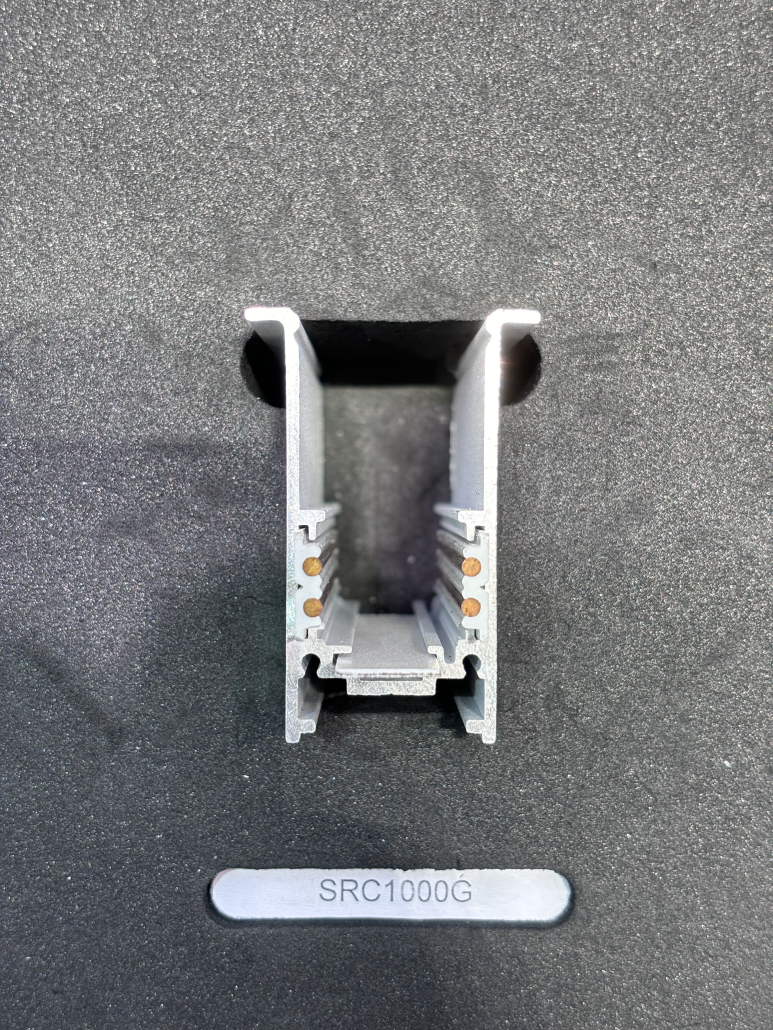
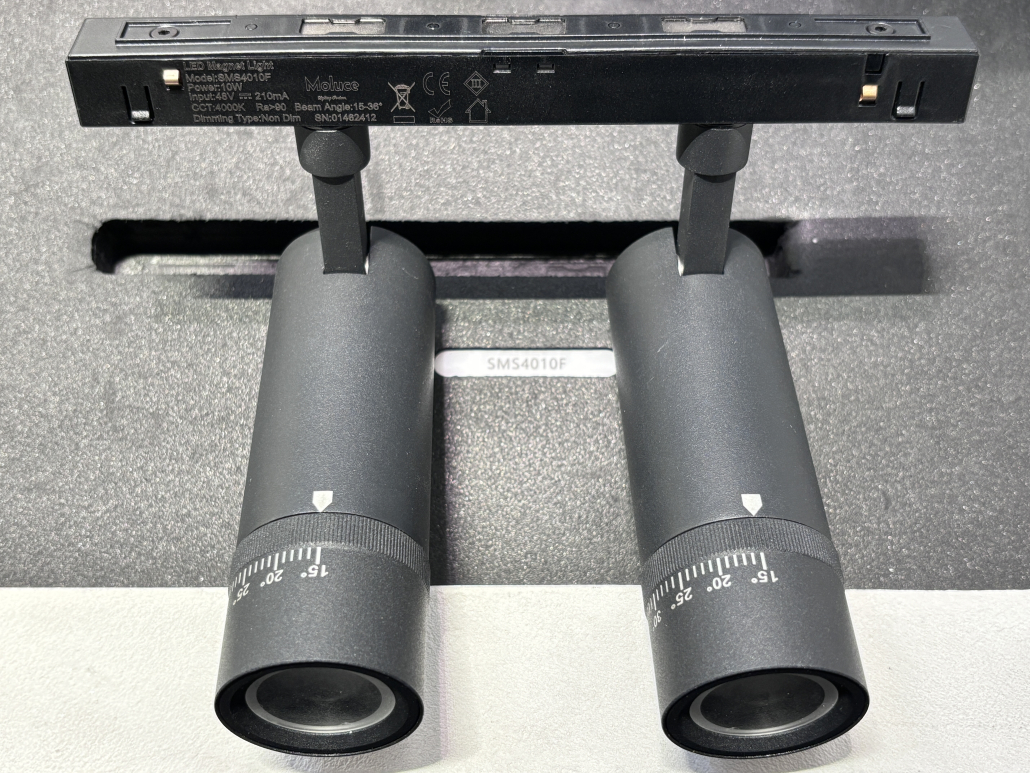
Diagram: cross-section showing busbar position, magnetic contact points, and fixture attachment
That’s the principle. In practice, how does this compare to the traditional track lighting systems most spaces already have installed?
Magnetic Track vs. Traditional Track Lighting — Key Differences at a Glance
| Comparison point | Magnetic track (48VDC) | Traditional track (high voltage) |
| Installation method | The track installation offers versatile options: embedded, surface-mounted, suspended, with power supplies integrated into the track as a single unit. The luminaires can be installed at any position along the track using magnetic mounting. | The wires must be directly connected to the mains power supply. The lighting fixtures are secured in specific positions via mechanical devices; installing or relocating the fixtures typically requires electrical work. |
| Adjustment flexibility | Fixtures can be repositioned by hand, on the fly, without tools or power shutdown. | Adjusting positions usually means loosening mechanical connectors. |
| Voltage | 48V DC low voltage. Remote driver handles AC-DC conversion. | 110 – 240VAC. High voltage throughout the track. |
| Luminaire compatibility | It uses proprietary private mold design but typically offers cross-compatibility within the same brand ecosystem. Different brands cannot guarantee compatibility. | Track heads must match track standard (HALO, POWERGEAR, etc.). Interchangeable within the same standard. |
| Maintenance cost | Luminaires can be swapped by in-house staff. If a driver fails, replacement is straightforward but the single point of failure can take out a whole run. | Individual track heads can fail without affecting others. Electrician often needed for fixture changes. |
| Typical applications | Retail, gallery, hospitality, high-end office — spaces where lighting layouts change regularly. | Warehouses, industrial, big-box stores, corridors — fixed lighting schemes with infrequent changes. |
Decision logic
Choose a magnetic track system when lighting flexibility matters week to week, and when the project can absorb a higher upfront cost per linear foot in exchange for reduced labor over time. Stay with traditional track when the lighting layout is fixed, the ceiling is industrial, or the budget for track infrastructure is the overriding constraint.
When Magnetic Track Lighting Makes Sense (And When It Doesn’t)
Should my project use magnetic track lights?
Magnetic track lighting suits spaces that demand both flexibility and aesthetics — retail, hospitality, and museum environments where displays change frequently, and where a clean, minimalist ceiling is non-negotiable. For projects involving long-term expansion of lighting fixtures, this is also an ideal choice. Unsuitable scenario characteristics: If your lighting layout is unlikely to change more than once within five years and your primary goal is to minimize upfront costs, traditional track lighting or fixed downlight systems may be more appropriate.
If you have confirmed that the commercial magnetic lighting system suits your project type, the next step is to clarify the specific components you are purchasing—a complete system consists of four distinct components, each requiring separate specification documentation.
The Complete Component Breakdown — What’s Inside a Magnetic Track Lighting System
The primary procurement issue with most Magnetic Track Systems is not selecting the wrong lamp type, but rather purchasing the system as a standalone unit. This often leads to incompatibilities—such as mismatched dimensions between drivers and lamps versus tracks, misaligned wire routing relative to lamp pins, or control protocols determined only after driver orders are placed.
A complete rail lighting system consists of four components: track guides, luminaires, power supply, and control system. Each component follows its own selection criteria and is interdependent in achieving the intended functionality. Any failure in any component necessitates either re-purchasing equipment before project completion or conducting on-site troubleshooting after project handover.
Below is the detailed content of each component, key points requiring clarification, and common pitfalls most buyers often encounter.
The Track Rail — Aluminum Profile, Width, and Depth Options
The track serves both as the structural framework and the conductive core of the system. This component is not a universal product; the selected width determines which luminaires can be compatible and the load capacity per meter of the track. The installation method dictates when specific specifications must be determined during construction—the embedded installation method, for instance, dictates the size of openings required in the ceiling.
Track Width and Load Capacity
Rails are most commonly available in 12mm, 31mm, and 46mm widths. Narrower profiles sit more cleanly in a ceiling and suit spaces where the fixture should disappear into the architecture. Wider rails carry more load per meter and suit longer runs or higher-output commercial installations.
| Track Width | Typical Max Load | Visual Profile | Best Suited For |
| 12mm | 320W MAX one circuit | Ultra-slim, near-invisible | Residential, boutique retail, low-ceiling spaces |
| 31mm | 768W MAX one circuit | Slim, standard architectural | Hospitality, galleries, mid-scale commercial |
| 46mm | 768W MAX one circuit | More visible | Large commercial |
These figures vary by manufacturer and busbar design. Before determining the drive’s dimensions, ensure the maximum power of the entire circuit is confirmed in writing.
Installation Type: A Decision With a Construction Deadline
There are three installation methods. The critical thing to understand is that the best-looking option — trimless recessed — is only available if you commit before the ceiling is closed.
Trimless recessed: The rail is embedded into a slot cut in the ceiling, sitting flush with the surface. No visible frame, no shadow line, no edge detail — the track disappears. This is the correct choice for hotels, premium retail, and high-end residential where the lighting system should read as part of the architecture rather than an addition to it. The hard constraint: the slot must be pre-cut and the rail installed during construction or full renovation. Once the ceiling is plastered and painted, this option requires opening the ceiling back up.
Surface-mounted: The rail is fixed directly to the finished ceiling surface using a mounting bracket. It is visible, but modern slim profiles make this aesthetically acceptable in most commercial contexts. For any retrofit project — a store refit, a restaurant renovation, an office upgrade — surface-mounted is almost always the practical default. Installation is faster and requires no structural preparation.
Suspended: The rail hangs from the ceiling via cables or rods. This works well in high-ceiling spaces: converted industrial showrooms, double-height hotel lobbies, restaurants with exposed structural ceilings. When specifying suspended installations, fixture drop height and cable tension need to be confirmed during the design phase, not left to the installer.
Timing rule: If the ceiling is open, specify trimless recessed. If the ceiling is already finished, specify surface-mounted. Make this decision at the start of the project — it determines the rail profile, the ceiling preparation scope, and your installation cost.
Material and Surface Treatment
Magnetic track rails are manufactured from aluminum alloy. This grade is specified for a practical reason: it has good thermal conductivity, which matters because the rail carries continuous current and will warm under load. Its surface is compatible with anodizing, powder coating, and custom RAL color matching. Standard off-the-shelf finishes are matte black and white. Custom RAL colors are available on OEM orders, typically with a minimum production quantity.
The Magnetic Fixtures — Spotlight, Linear, Pendant, Wall Washer, Grille Light
Magnetic track systems support multiple fixture types on a single continuous rail. A spotlight, a linear module, and a pendant can all run on the same track simultaneously —The irradiation direction can be independently adjusted; if the control system supports it, the brightness and color temperature can also be independently adjusted. This is one of the clearest practical differences from traditional track lighting, which is limited to one fixture type per rail family.
Each fixture type solves a specific lighting problem. Choosing the wrong one for a space isn’t an aesthetic issue — it affects delivered lux levels, glare control, and whether the lighting actually does what the space requires.
| Fixture Type | Primary Function | Typical Power | Beam Angle | Strongest Application |
| Adjustable Spotlight | Directional accent lighting | 5W–30W | 15°–60° | Retail displays, jewelry cases, restaurant, museum exhibits |
| Linear Module | Ambient / general illumination | 10W–30W/m | 90°–120° wide | Corridors, office ambient, shelf lighting |
| Pendant | Downward task or decorative | 5W–15W | Varies by design | Restaurant tables, bar counters, reception desks |
| Wall Washer | Even vertical surface coverage | 10W–20W | Asymmetric wide | Feature walls, display walls, exhibition surfaces |
| Grille Light | Anti-glare ambient output | 5W–25W | 15°–45° | Offices, reading rooms, long-duration occupancy spaces |
Key Parameters to Specify — Not Just Fixture Type
CRI: Specify the number, not the category. CRI ≥ 95 for museum and jewelry applications. CRI ≥ 90 for hotel and premium retail. CRI ≥ 80 for standard commercial and office. “High CRI” without a figure is not a specification.
Color temperature: 2700K–3000K for hospitality and residential; 3500K–4000K for retail and workplace; tunable white (typically 2700K–6500K adjustable) where the space requires lighting flexibility across different times of day or use modes.
Beam angle: 10°–20° for accent and focused display. 24°–36° for general retail fill. 45°+ for ambient. Zoomable spotlights — where beam angle is mechanically adjustable within a single fixture — are available and useful for gallery and museum contexts where exhibit layouts change regularly.
Compatibility: The Issue Most Buyers Discover Too Late
Magnetic track fixtures are not interchangeable across manufacturers, and often not across product lines within the same manufacturer. A fixture designed for a 31mm rail profile will not align correctly on a 46mm rail from a different brand. Conductor pin configuration — 2-pin versus 4-pin, and pin spacing — varies between systems. Magnetic strength is rated for specific orientations and load weights.
Before placing any order that sources rail and fixtures from different suppliers, confirm the following in writing:
- Track width: does the fixture housing match the rail profile exactly?
- Power Supply width: does the driverhousing match the rail profile exactly?
- Pin configuration: how many conductor pins, and does the spacing match the rail’s busbar layout?
Mixed-brand systems are a consistent source of contact failures, flickering on startup, and fixtures that don’t hold position under vibration. If you need to source from multiple suppliers, request a physical compatibility test with samples before committing to production volumes.
The Driver (Power Supply) — Sizing Rules and What Happens If You Get It Wrong
The driver converts mains AC power to the 48V DC current the magnetic track system runs on. Selecting the wrong driver is the most common technical error in magnetic track procurement — For 48V magnetic track lighting systems with constant-voltage drivers, insufficient driver wattage will reduce light output. Voltage mismatch is also critical: running a 48V fixture on a 24V driver causes significant dimming, while running a 24V fixture on a 48V driver will burn out the fixture.
The Sizing Formula
Use this every time, without exception:
Required driver rated power = Total fixture wattage × 1.25
The 1.25 multiplier is not a safety buffer — it is an operational requirement. A driver running continuously at 100% of its rated capacity operates at the upper limit of its thermal design range. Internal components — capacitors, inductors, thermal management materials — degrade faster under sustained high temperatures. The practical result is a driver that fails in 12–18 months rather than the 5–7 years you would expect at normal operating temperatures. The 25% headroom keeps the driver in its rated thermal window.
Worked Example
You are installing 10 × 12W spotlights on a single rail.
- Total load: 10 × 12W = 120W
- Minimum driver rating: 120W × 1.25 = 150W
- A 120W driver runs at exactly 100% capacity — technically within rated output, but thermally stressed from the first hour of operation
- The correct specification is a 150W or 200W driver
Configuration Reference
| Total Fixture Load | Minimum Driver Rating | Recommended Driver Rating |
| Up to 40W | 50W | 60W |
| 40W – 64W | 80W | 100W |
| 64W – 96W | 120W | 150W |
| 96W – 144W | 180W | 200W |
| 144W – 192W | 240W | 250–300W |
For runs longer than 8–10 meters, or installations covering multiple independently controlled zones, consider splitting across two drivers rather than scaling to a single large unit. This keeps cable voltage drop within tolerance and gives you zone-level switching without additional relay hardware.
The Failure Sequence You Want to Avoid
An overloaded driver does not fail suddenly. The degradation follows a predictable sequence:
- Output voltage becomes unstable under peak load — fixtures flicker intermittently, particularly at startup
- Internal temperature exceeds the rated limit — thermal protection triggers, shutting the system off; it restarts once cooled, then shuts off again
- Repeated thermal cycling accelerates component degradation — output voltage drops and stabilizes below the rated 48V
- Driver fails permanently
By the time intermittent flickering appears, the driver is already operating past its design point. And in most manufacturer warranty terms, damage resulting from operation above rated load is explicitly excluded from coverage. You will be buying a replacement driver out of pocket.
Driver specification checklist:
- Total fixture wattage calculated from actual fixture specs, not estimated?
- Driver rated output ≥ 125% of total fixture load?
- Driver installation location has adequate airflow? (Enclosed junction boxes without ventilation are a common cause of premature failure — heat needs somewhere to go.)
- Driver protocol confirmed to match the control system? A DALI driver and a 0-10V driver are different hardware. They cannot be exchanged after installation.
Control System Options — DALI, 0-10V, Zigbee, Bluetooth, Casambi
The control system determines how your magnetic track lighting is dimmed, grouped, and automated. This decision must be made before the driver is ordered — not after — because each control protocol requires a specific driver type, and these are not field-swappable.
Protocol Comparison
| Protocol | Wiring Required | Control Granularity | BMS / Smart Home Integration | Best Project Context | Cost Level |
| DALI-2 | Yes — dedicated control wire | Per-fixture individual address | Full BMS integration | Large commercial, museums, hotels with building automation | Higher |
| 0-10V | Yes — additional low-voltage signal wire | Per circuit, not per fixture | Basic sensors and timers only | Single-zone commercial, budget-constrained retrofits | Low |
| Zigbee | No — wireless | Per fixture or group | Amazon Alexa, Google Home, SmartThings via hub | Mid-size retail, hospitality, high-end residential | Medium |
| Bluetooth Mesh | No — wireless | Per fixture or group | Smartphone app; limited hub integration | Small retail, single-room residential | Low–Medium |
| Casambi | No — wireless, Bluetooth Mesh-based | Per fixture, scene programming, scheduling | Casambi app; KNX gateway available; no native Alexa/Google | Hospitality, professional retail, designer-specified smart control without BMS | Higher |
How to Choose
Work through these questions in order rather than evaluating protocols side by side in the abstract:
Does the project have a building management system, or need to integrate with one? DALI-2 is the answer. It is the only protocol here that maps cleanly to professional BMS infrastructure and supports per-fixture addressing at the scale of a large hotel or commercial complex. Other protocols offer workarounds; DALI-2 is built for this from the ground up.
Does the project need smart control but has no BMS? Casambi is the professional-grade choice for this scenario. It runs on Bluetooth Mesh — no hub required, no cloud dependency — and supports scene programming, time scheduling, and daylight sensors. It is widely specified by lighting designers in European and North American hospitality and retail projects precisely because it delivers professional control behavior without requiring BMS infrastructure. Note: Casambi does not integrate directly with Alexa or Google Home. That is a deliberate design boundary, not a limitation to be worked around.
Does the project need voice control or smart home integration? Zigbee with a compatible hub (Amazon Echo with built-in Zigbee, a dedicated Zigbee bridge, or a Tuya-ecosystem gateway) is the right path. Confirm hub compatibility before specifying — Zigbee is an open standard but implementations vary between manufacturers, and not all Zigbee devices pair with all hubs without additional configuration.
Is the project small-scale with simple dimming requirements and a fixed budget? 0-10V. It is reliable, well understood by any competent electrical contractor, and requires no configuration beyond setting a physical dimmer or sensor. The limitation — dimming operates at circuit level, not per fixture — is not a problem for single-zone spaces where uniform ambient control is sufficient.
The Specification Rule That Eliminates the Most Common Late-Stage Problem
Control protocol must be specified before drivers are ordered. A DALI-2 driver and a 0-10V driver are different products with different internal electronics. An installation that switches control protocols after drivers are on-site means replacing the drivers — not reprogramming anything. This is a common, entirely avoidable cost.
Lock in the control decision at the beginning of the specification process and include it explicitly in the driver purchase order.
With track rail, fixtures, driver, and control system confirmed, you have a complete bill of materials for the magnetic track system. The next step is translating those component specifications into a configuration that fits your specific space — because the right setup for a hotel lobby looks quite different from what a jewelry store or a museum gallery actually needs.
Magnetic Track Lighting installation Guide — From Pre-Construction Planning to Final Commissioning
The most common post-installation problems with magnetic track systems — flickering, fixtures that won’t hold, lights that won’t turn on — trace back to decisions made before installation started.
H3: Stage 1 — Pre-Construction Planning (What to Prepare Before the Ceiling Is Sealed)
Get these five things right before the ceiling is sealed.
- Conduit routes and sizing
Wire gauge and conduit diameter depend on track length and load. For a recessed magnetic track, coordinate channel routes with the ceiling structure now.
Skip → Undersized conduit blocks future upgrades; missing routes force ugly surface raceways.
- Power entry points and maintenance access
Mark where each track segment gets power and where junction boxes sit. Plan how to reach a stuck fixture in a flush track — from above or via a discreet access pocket.
Skip → Installers cut exploratory holes; replacing a fixture turns into drywall surgery.
- Driver location and ventilation
Place drivers in ventilated, accessible spots. Respect the maximum cable distance to the track — voltage drop causes flicker.
Skip → Overheated driver fails early. Replacing one sealed above plasterboard means cutting into the finished ceiling.
- Access panels
Install a dedicated access panel (min. 400 mm × 400 mm) directly above every driver — not a random tile.
Skip → Every driver failure becomes a ceiling repair job.
- Final track layout drawing
Lock in exact positions, lengths and orientations before drywall. Ask your supplier for CAD templates to spot joist conflicts while changes are free.
Skip → A joist blocks the track run; late redesign burns time, materials and client confidence.
If you need a track layout template or pre‑construction checklist, contact our engineering team — we provide this as a standard part of our project support.
Once the ceiling preparation is done, the choice of installation method determines everything from the final look to how long installation takes on site.
Stage 2 — Four Installation Methods Explained
- Method 1: Trimless Recessed (Flush-Mount)
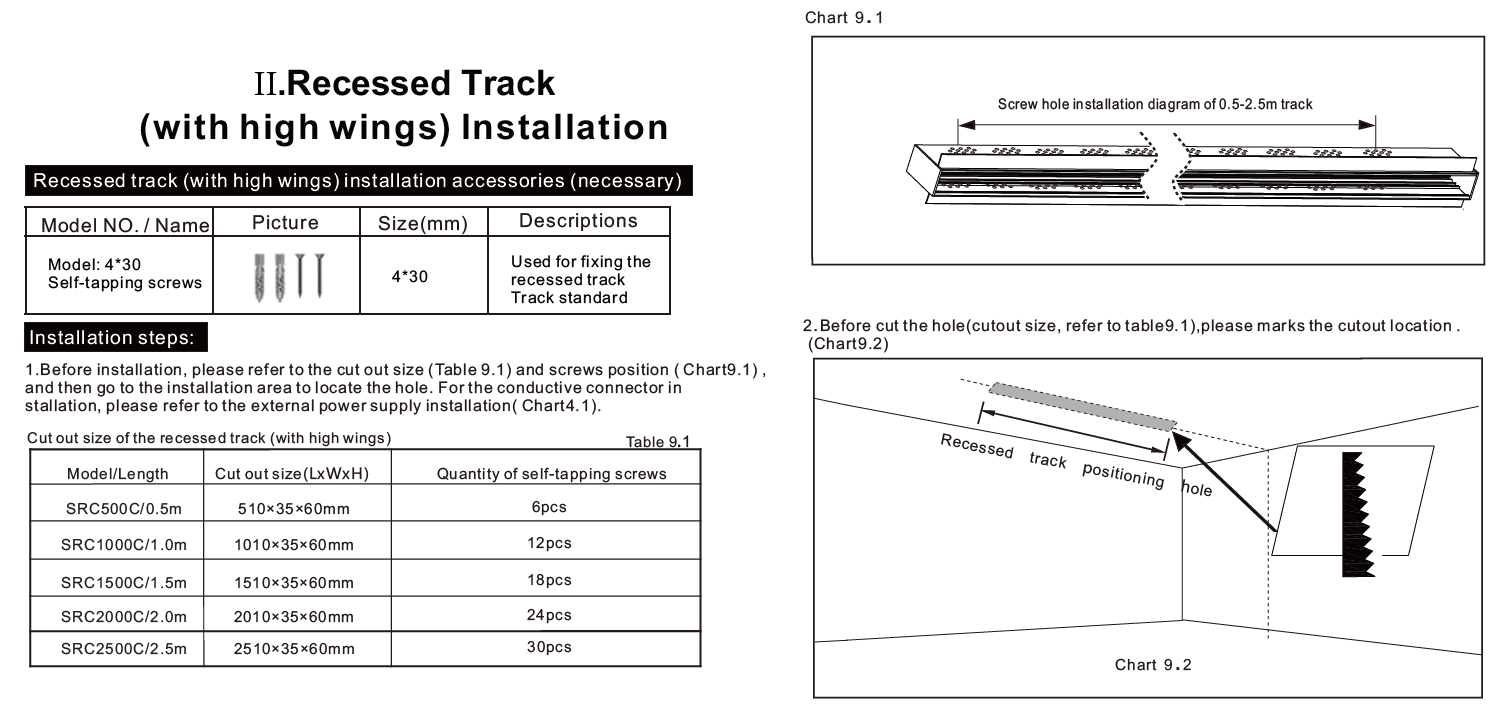
This is the cleanest result — the track face sits flush with the ceiling surface, with no visible frame or shadow line. It’s the standard specification for premium retail, hotel, and high-end residential where the lighting system should read as part of the ceiling, not an addition to it.
Ceiling requirements:
Minimum plasterboard (drywall) thickness: 12.5mm; 15mm preferred for cleaner edge retention
Slot width: must match the track profile exactly — typically 16–22mm depending on rail model; confirm with your supplier’s installation drawing
Slot depth: sufficient to seat the full track height plus any mounting clip depth; typically 40–60mm below the finished ceiling surface
Sufficient ceiling void above: minimum 80–100mm above the plasterboard to accommodate the track body and cable routing
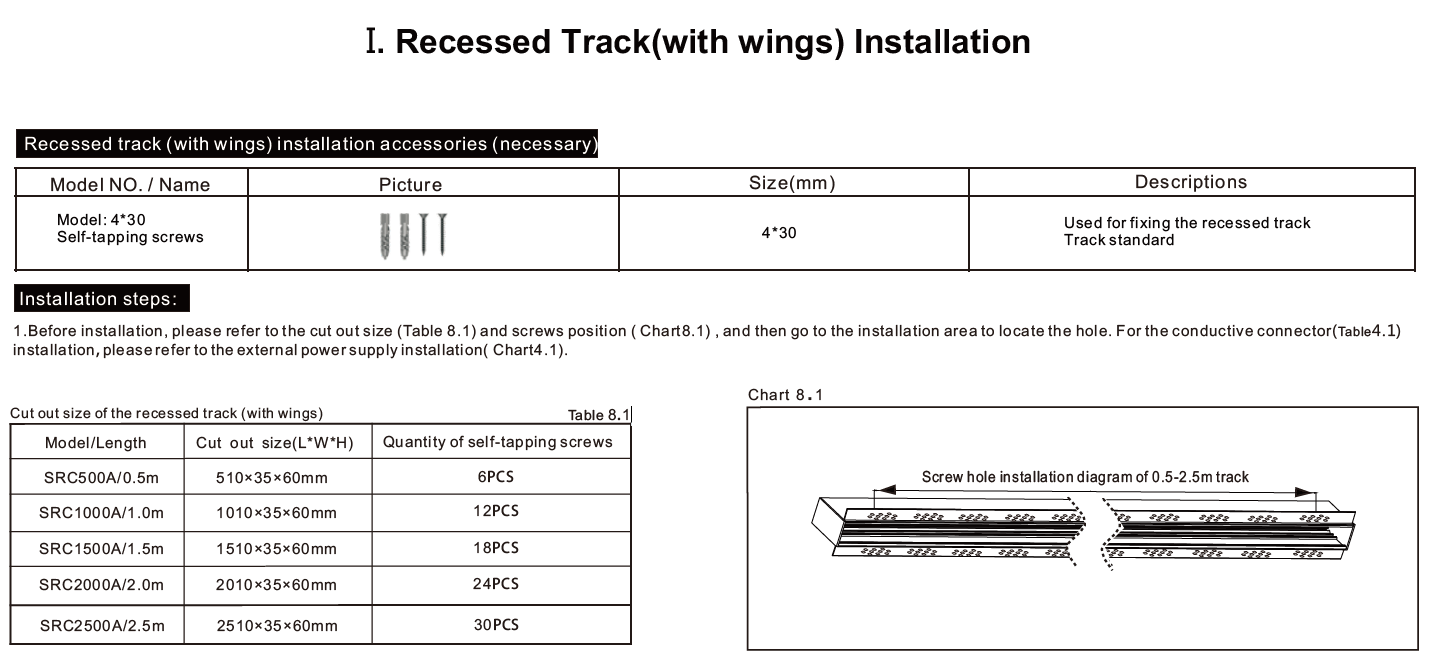
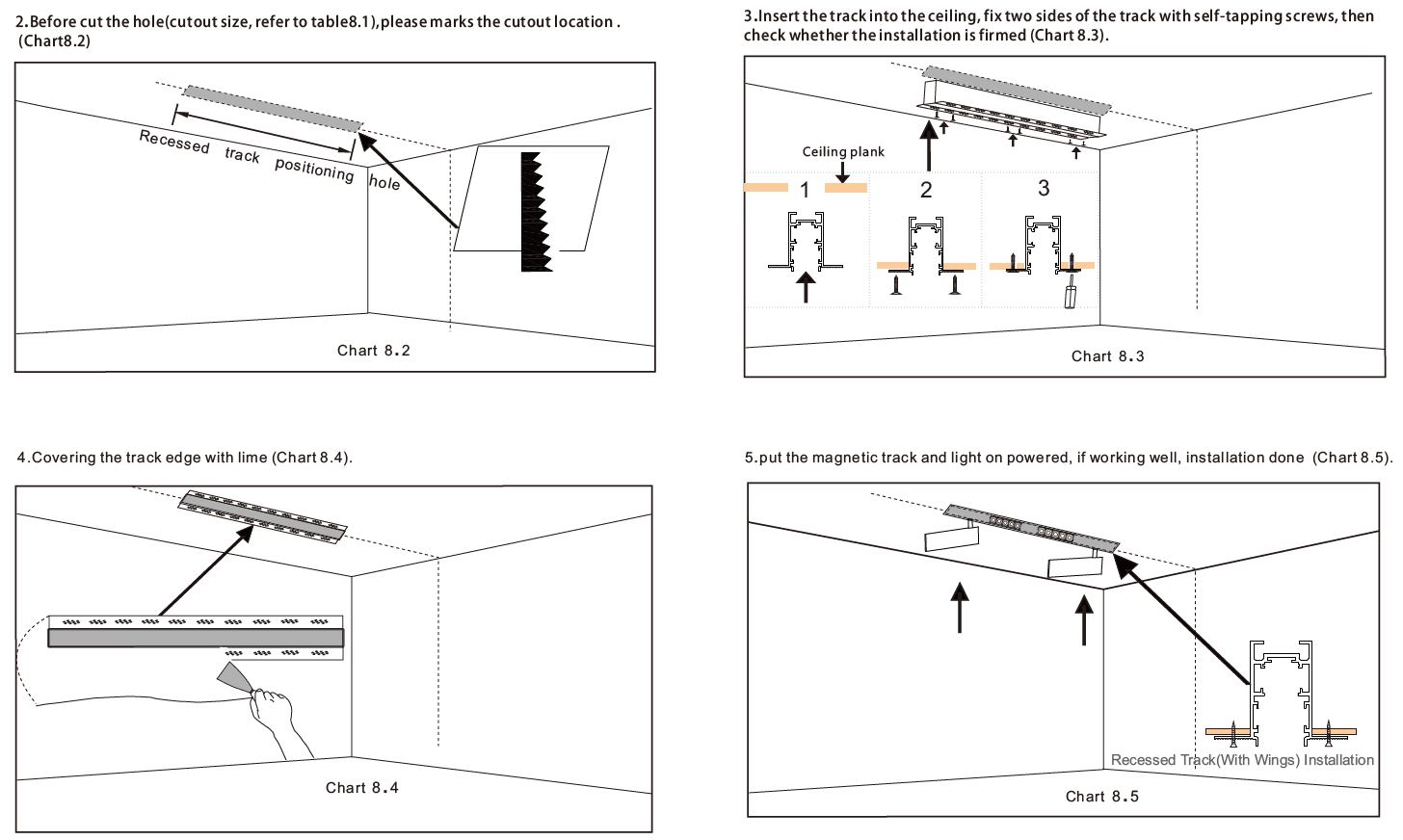
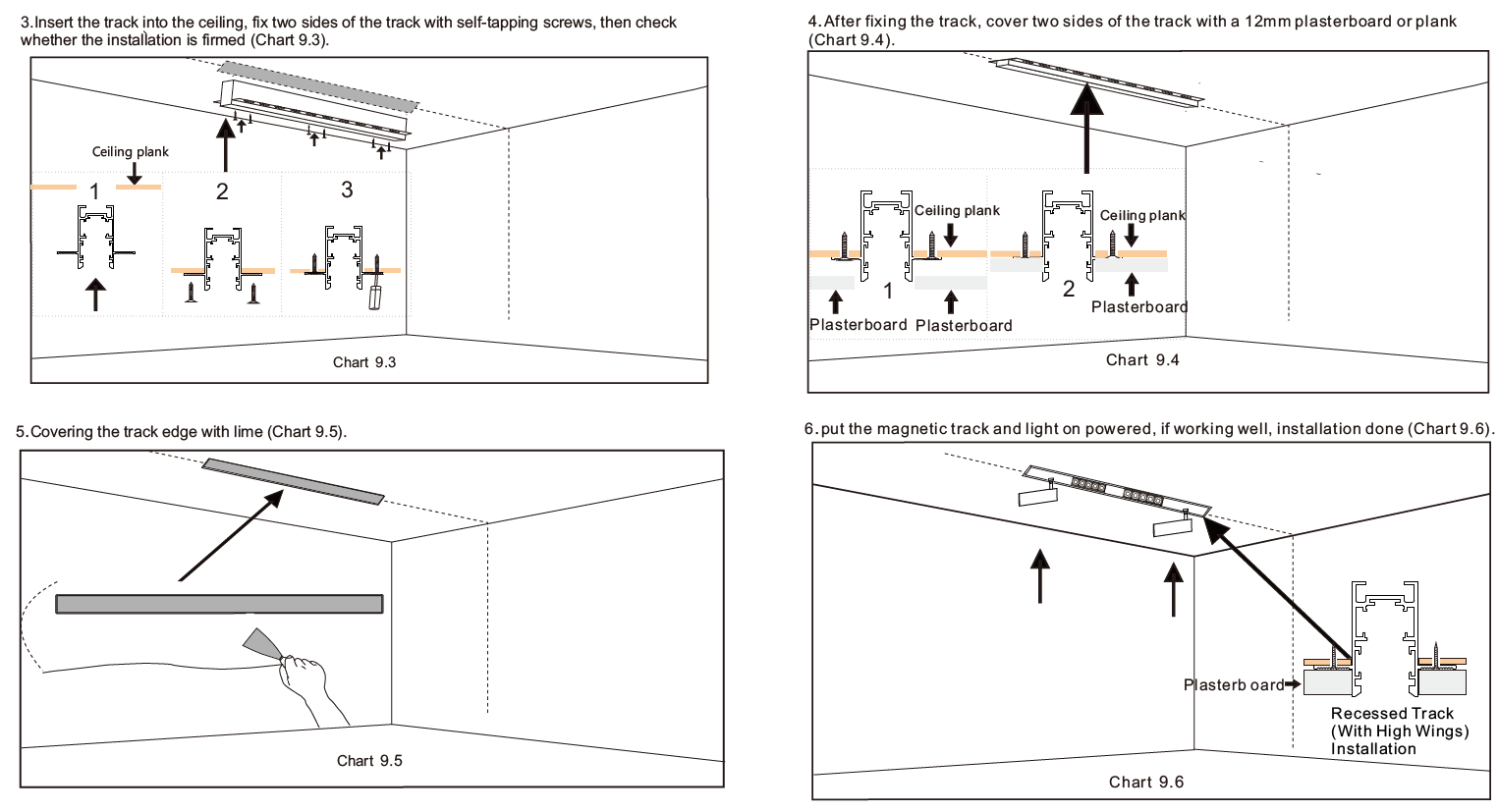
Installation sequence:
Mark the slot position on the plasterboard before ceiling finish is applied
Cut the slot to specified width and depth
Install mounting clips or suspension brackets at intervals specified by the manufacturer (typically every 600–1000mm)
Route power cable through the void to the slot entry point
Seat the track into the slot, connect the input cable, and secure to mounting clips
Apply plasterboard finish compound to close the gap between track edge and ceiling surface; sand flush when dry
Critical: This installation cannot be done after the ceiling is finished without cutting and repairing the ceiling. If the project is in the finishing or soft-fit phase, trimless recessed is no longer available to you. Specify surface-mounted instead and factor in the aesthetic difference when briefing the client.
- Method 2: Surface-Mounted
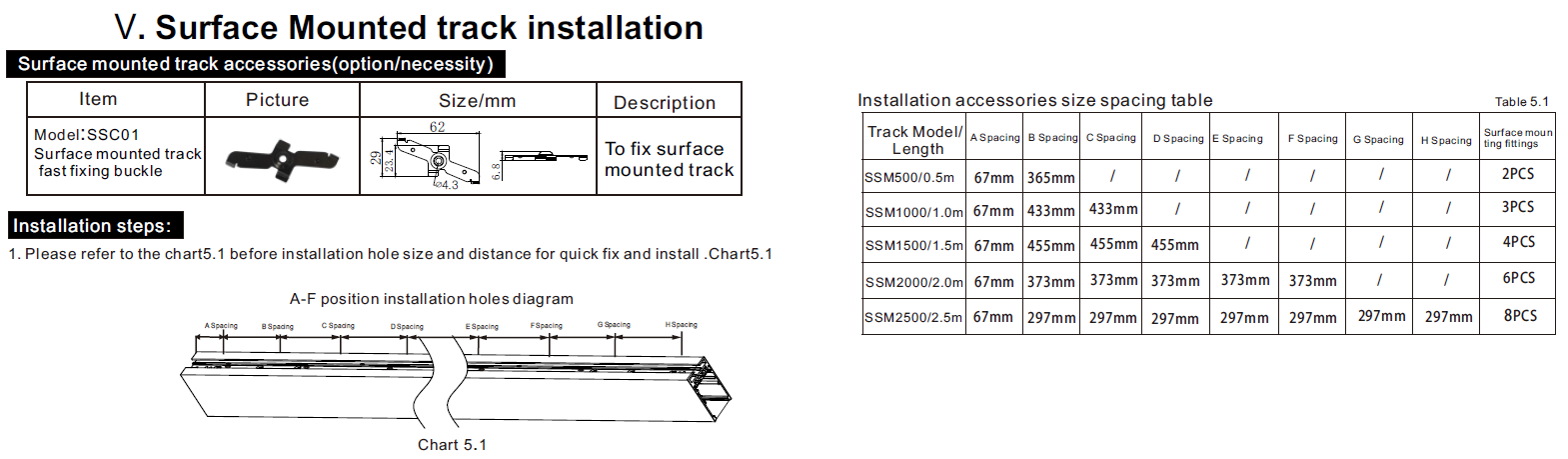
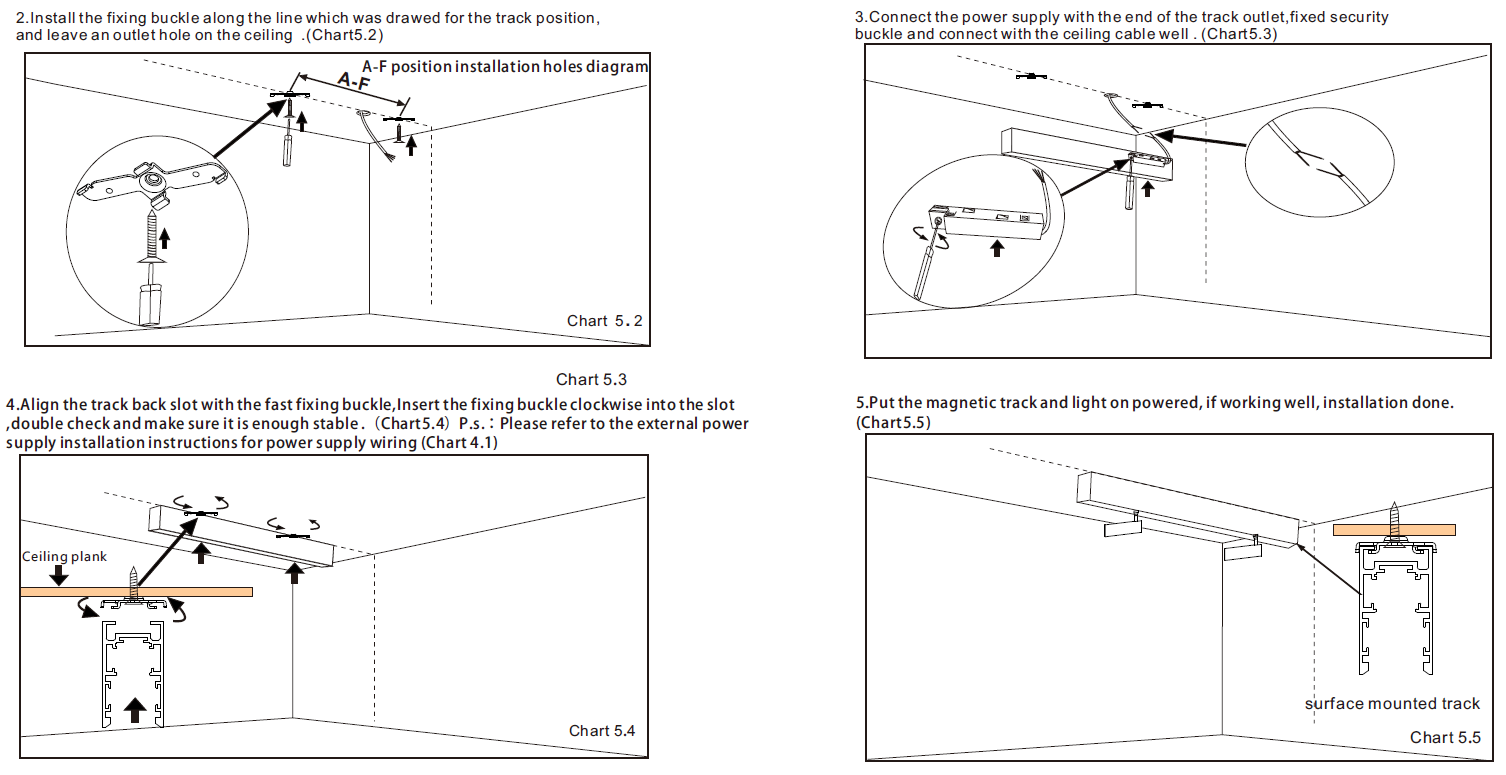
The track mounts directly onto the finished ceiling surface using a bracket system. It sits proud of the ceiling — typically 54mm depending on the bracket profile. In most commercial contexts, slim modern rail profiles make this visually acceptable. For retrofits, it’s almost always the practical default.
Ceiling requirements:
Timber joists or steel purlins: standard M6 screw fixing directly into structural timber or through a steel bracket; no special preparation needed
Light steel ceiling grid (non-structural): surface-mounted track must be fixed through the grid into the structural soffit above, not into the grid itself — the grid is not designed to carry point loads from track and fixtures
Concrete soffits: use concrete anchors rated to the combined weight of track and fixture load; confirm anchor spacing with the manufacturer’s load table
Installation sequence:
Mark fixing positions along the ceiling, spacing per manufacturer specification (typically every 600–800mm)
Drill fixing holes; insert appropriate anchor type for the substrate
Fix mounting brackets; confirm level before tightening
Route and connect input cable before clipping the track body into the brackets
Clip track into brackets and lock
Critical: Where two track sections join, use manufacturer-supplied straight connectors rather than cutting tracks to butt-join. Surface-mounted joints are visible — a clean connector finish matters. Misaligned joints or improvised joins are the most common cause of the surface-mounted method looking cheap on a quality project.
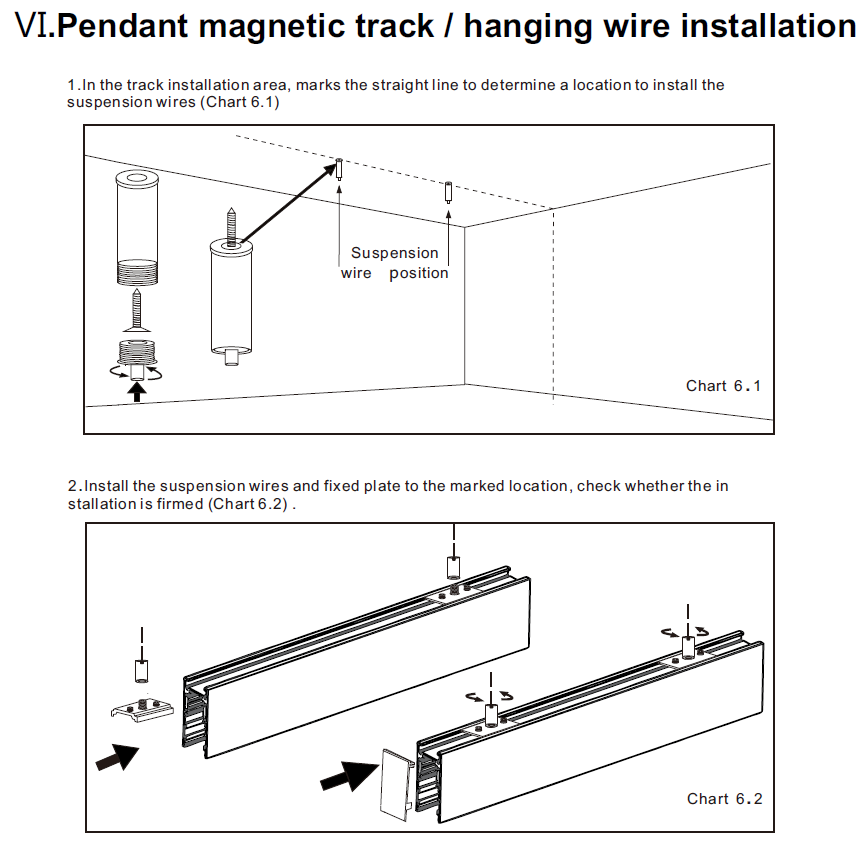
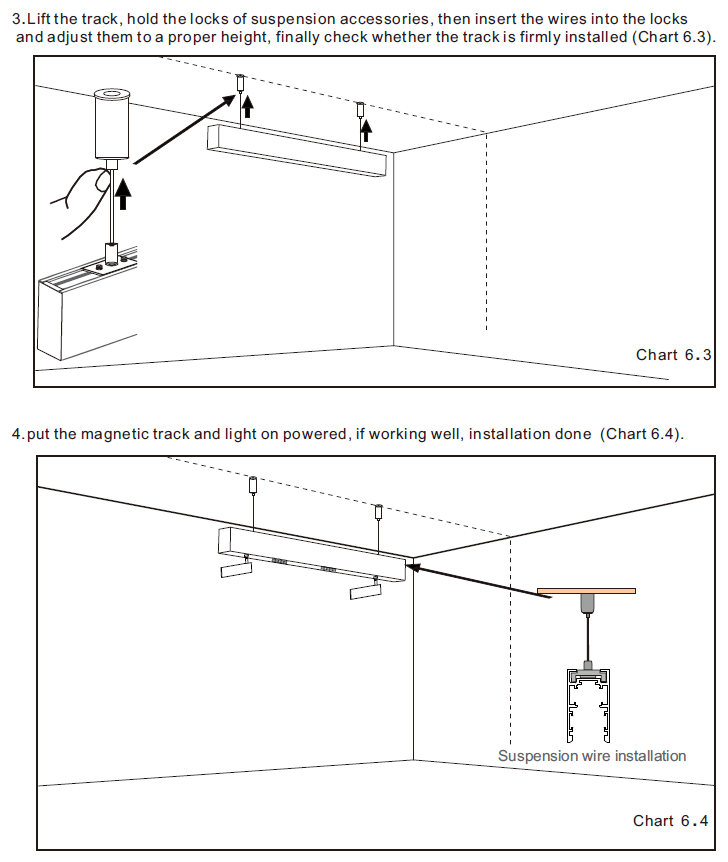
- Method 3: Suspended
The track hangs from the ceiling or structural soffit on steel cables or rods. This works well in spaces where the ceiling is too high for effective downlighting from a flush position, or where the architectural aesthetic calls for a floating luminaire plane — converted industrial spaces, double-height lobbies, restaurant dining rooms with exposed structure.
Hangline requirements:
Minimum wire diameter:
Use 1.2 mm stainless steel wires, with two wires per meter of track; Load calculation: Sum the weight of the track section itself (per meter) and the total weight of all luminaires installed on it; The resulting total weight must fall within the rated working load specified by the wire manufacturer and comply with a safety factor of at least 5:1.
Cable spacing:
The fixed spacing between steel cables must strictly comply with the manufacturer’s specifications; typically, it is set at 1000 millimeters depending on the length of the track section.
Height adjustment:
Use adjustable cable grippers (also called cable tensioners or locking grippers) rather than fixed-length terminations. Adjustable grippers allow fine-tuning of track level after installation without removing the cable. This matters because ceiling anchor points are rarely perfectly level across a run, and shimming individual cables after the fact without adjustable grippers requires re-drilling anchor points.
Critical: Fix suspension cables only to the structural soffit, concrete deck, or structural steel — never to a suspended ceiling grid. Light steel ceiling grids are not load-bearing elements and are not rated for point loads from suspended luminaires. On projects where the structural soffit is not accessible, confirm with the structural engineer what fixing is appropriate before specifying suspended installation.
Click here to add your own text
- Method 4: Curved and Custom-Shape TrackStandard straight track sections can be combined with angled connectors to create L-shapes, T-junctions, and basic polygonal layouts. For genuinely curved runs — arcs, circles, S-curves — a flexible track profile is required.Material and bending: Flexible magnetic track uses an aluminum alloy profile with a scored or slotted spine that allows bending without kinking. The internal copper busbar conductors are either pre-segmented to allow flex, or use a continuous flexible conductor strip. The key difference from standard track is that the profile’s structural integrity depends on maintaining a minimum bend radius — bend tighter than this and the busbar will distort, creating contact gaps or electrical faults.
Bending methods:
Field cold-bending: The installer bends the flexible track on-site using a bending jig or by hand against a radius template. This is faster and avoids lead times, but accuracy depends on the installer’s skill. Suitable for gentle arcs and curves where precise geometry is not critical.
Factory pre-bending: The track is supplied pre-bent to a specific radius or custom shape, based on a DXF file or physical template provided by the client. Factory bending uses controlled tooling, producing tighter tolerances and consistent results across multiple track sections. Required for precise circular layouts, compound curves, or any application where the geometry must match an architectural feature exactly. Lead time is typically 10–15 working days beyond the standard track lead time; confirm before committing to a project schedule.
Critical: Every flexible track profile has a minimum bend radius — typically 300–600mm depending on the profile width and busbar design. Bending below this radius will permanently deform the busbar, which cannot be repaired. Always confirm the minimum bend radius with your supplier before specifying a curved layout, and include this figure in the brief to the installer.
Stage 3 — Wiring, Driver Connection, and Safety Checks
Step 1 — Seat the connector
Feed the 4-pin connector cable through the track’s cable exit hole. Insert the connector into the track input slot and tighten the safety clip with a flathead screwdriver until fully locked.
Step 2 — Connect DC output (driver → track)
Pin Color Function 1 Red 48V+ 2 Black 48V− 3 Blue Dimming signal + 4 White Dimming signal − Connect red to the driver’s 48V+ terminal and black to 48V−. If no dimming is required, leave pins 3 and 4 disconnected.
Polarity matters. Reversed connections produce no output. Confirm against the driver’s terminal labels before tightening.
Step 3 — Connect AC input (mains → driver)
Pin Color Function 1 Brown Line (L) — AC 220V 2 Blue Neutral (N) — AC 220V AC input must be wired by a qualified electrician. Keep the driver isolated from mains supply until all connections are complete.
Ceiling board: Driver mounts against ceiling substrate. Timber board required, 8–15mm thickness.
Pre-power-on checklist
- Connector fully seated and safety clip tightened
- DC polarity confirmed: red → 48V+, black → 48V−
- Dimming wires connected or capped
- AC input wired and confirmed by electrician
- Total fixture load within driver rating (max 80% continuous)
- At least one fixture on the track before powering on
On 48V safety
48V DC is below the 60V threshold defined in IEC 60479 as safe extra-low voltage. Under normal conditions, live conductors inside the track do not present a shock hazard — fixtures can be repositioned on a powered track without switching the driver off.
How to Specify the Right System for Your Project — A Scene-by-Scene Guide
The right magnetic track configuration for a museum is not the same as what works in a hotel lobby or a retail store — not just aesthetically, but in terms of CRI requirements, control protocol, fixture types, and driver sizing. This section gives you the specific parameters for each application type.
Retail & Boutique Store Lighting
Method 4: Curved and Custom-Shape Track
The priority in retail is accurate color rendering and precise beam control. Merchandise needs to look the way it was designed to look — which means CRI and beam angle are non-negotiable parameters, not aesthetic preferences.
Recommended specifications:
| Parameter | Specification |
| CRI | ≥ 90 |
| Color temperature | 3000K (fashion, luxury, leather goods) / 4000K (electronics, sportswear, FMCG) |
| Beam angle | 15°–24° for display spotlighting; 36°–45° for aisle fill |
| Fixture type | Adjustable spotlight — must support both pan and tilt adjustment |
| Control | 0-10V (single-zone dimming) or DALI (scene presets: daytime / evening / window display) |
Track layout: Run the track parallel to display walls, set 600–800mm from the wall face depending on ceiling height. Combine spotlights with linear modules along the ceiling center for ambient fill. A typical display bay works well with 70% narrow-beam spotlights and 30% wide ambient output.
Hotel — Lobby, Guest Room, Restaurant
Hotel specifications vary significantly by zone. Use the same rail system throughout, but specify fixtures and drivers independently for each area.
Lobby
| Parameter | Specification |
| CRI | ≥ 90 |
| Color temperature | 2700K–3000K |
| Fixture type | Pendant modules + linear modules for layered ambient |
| Control | DALI — required for day/evening/event scene switching |
Restaurant
| Parameter | Specification |
| CRI | ≥ 95 — food color rendering requires higher accuracy than general hospitality |
| Color temperature | 2700K |
| Fixture type | Pendant modules over tables + wall washer modules for feature surfaces |
| Control | DALI or Casambi — table dimming and atmosphere presets |
Guest Room
| Parameter | Specification |
| Power per fixture | 6–10W — avoid single high-output sources that create glare in a small space |
| Color temperature | Tunable White (2700K–4000K) — warm for evening, neutral for morning work mode |
| Flicker | Flicker-free driver required — guests spend extended time in the room |
| Control | Zigbee or Bluetooth, integrated with room control system |
Museum & Gallery Lighting
Museum lighting has the strictest specification requirements of any interior application. The parameters here are not recommendations — they are the baseline below which artwork and exhibit integrity is at risk.
Required specifications:
| Parameter | Specification |
| CRI | ≥ 97 — accurate color reproduction is fundamental to how exhibits are perceived |
| UV output | UV-free LED required — UV radiation degrades pigments, dyes, and organic materials over time. Request UV test data from your supplier, not just a label claim |
| Infrared | Low-IR LED preferred for heat-sensitive exhibits |
| Fixture type | Zoomable spotlight (15°–60° adjustable beam angle) — exhibit layouts change; replacing fixtures every time is not viable |
| Control | DALI-2 — individual fixture addressing, per-zone dimming, 0.1% minimum dim level for sensitive exhibits |
Layout note: Position track 500–700mm from the wall face for vertical surface illumination. For freestanding exhibits, ceiling-mounted track centered above the display zone with zoomable heads allows the same fixture to serve both narrow accent and wider object illumination without hardware changes.
Office & Workspace
Office lighting is governed less by aesthetics and more by compliance. The key parameter most office lighting specifications get wrong is glare — not color temperature.
Recommended specifications:
| Parameter | Specification |
| Color temperature | 4000K–4500K |
| CRI | ≥ 80 standard workspaces; ≥ 90 if video conferencing is a regular use case (skin tone rendering matters on camera) |
| Glare control | UGR < 19 — mandatory requirement under EN 12464-1 for office and screen-based workspaces. Specify this in the procurement document, not just the color temperature |
| Fixture type | Linear modules for ambient (uniform ceiling output) + adjustable spotlights for task zones and presentation areas |
| Control | 0-10V for simple layouts; Casambi for spaces requiring meeting mode / focus mode / presentation mode switching |
UGR note: UGR < 19 is not automatically achieved by choosing a "low glare" fixture. Require the supplier to provide a UGR calculation for your specific room dimensions and mounting height, or request the UGR table from the photometric data sheet.
High-End Residential
Residential specification differs from commercial in three ways: visual scale, acoustic environment, and smart home integration. A fixture that performs well in a hotel lobby can look oversized and sound audible in a living room.
Recommended specifications:
| Parameter | Specification |
| Track width | 15mm slim profile — proportionally appropriate for residential ceiling heights and room scale |
| Fixture type | Mini spotlight — compact housing, 6–12W, low visual mass |
| Color temperature | Tunable White (2700K–4000K) — supports morning alertness and evening wind-down without installing separate fixture types |
| Driver | Low-noise driver required — PWM switching noise is inaudible in a commercial space and clearly audible in a bedroom or study. Ask your supplier to confirm acoustic rating or provide a sample for on-site testing before specifying |
| Control | Zigbee or Bluetooth Mesh — native integration with Apple HomeKit, Google Home, Amazon Alexa, or Tuya ecosystem depending on the client’s existing platform |
Installation: 15mm trimless recessed is the standard residential specification. Confirm ceiling void depth and substrate thickness (minimum 12.5mm plasterboard) during the design phase — residential renovations often have tighter ceiling voids than commercial fit-outs.
Certifications, Safety Standards & What They Mean for Your Market
Specifying the wrong certifications — or accepting certifications you haven’t verified — is one of the most common ways lighting projects run into compliance problems after installation. Requirements differ by market, and CE does not substitute for UL. Here’s what applies where, and how to confirm what your supplier actually has.
CE, RoHS, and ENEC — Requirements for European Projects
CE marking
CE is mandatory for electrical products placed on the EU market. For magnetic track lighting systems, CE covers two directives:
- Low Voltage Directive (LVD 2014/35/EU)— electrical safety of the luminaire and driver
- Electromagnetic Compatibility Directive (EMC 2014/30/EU)— the product does not cause or is not susceptible to electromagnetic interference
CE is a self-declaration. The manufacturer signs a Declaration of Conformity (DoC) and affixes the CE mark — no third-party test lab is required to issue it. This means a CE mark alone tells you nothing about whether the product has actually been independently tested. Always request the DoC and confirm it references the correct directives and product model numbers.
RoHS
RoHS (Restriction of Hazardous Substances Directive 2011/65/EU) restricts six substances including lead, mercury, and cadmium. Mandatory for all electrical products sold in the EU. RoHS compliance is a materials requirement, not an electrical safety certification — a product can be RoHS compliant and still fail electrical safety testing. The two are separate.
ENEC
ENEC is a voluntary third-party certification issued by accredited European test laboratories. Unlike CE, ENEC requires independent testing against the relevant EN standards. In high-specification commercial projects — particularly hospitality, museum, and public building contracts in Germany, the Netherlands, and Scandinavia — ENEC is increasingly specified as a procurement requirement rather than a preference. If your project tender documents reference ENEC, CE alone will not satisfy the requirement.
| Certification | Mandatory | Third-Party Tested | Covers |
| CE | Yes | No (self-declaration) | Electrical safety + EMC |
| RoHS | Yes | No | Material composition |
| ENEC | No | Yes | Electrical safety (EN standards) |
UL, ETL, and DLC — Requirements for North American Projects
UL Listed
UL listing is issued by Underwriters Laboratories following independent product testing against ANSI/UL standards. In the United States, most commercial building codes and electrical inspection authorities require luminaires to carry UL listing or an equivalent recognized certification. On commercial projects, an unlisted product will typically fail inspection.
UL listing is product-specific and model-specific. A UL certificate issued for one fixture model does not extend to other models in the same range unless they are explicitly included in the listing.
ETL Listed
ETL listing (issued by Intertek) is the functional equivalent of UL listing and is accepted by the same inspection authorities under the National Electrical Code. For procurement purposes, UL Listed and ETL Listed are interchangeable. ETL certification is often faster to obtain, which is why some manufacturers carry ETL rather than UL.
DLC (DesignLights Consortium)
DLC is not a safety certification. It is an energy efficiency qualification program. DLC-listed products meet defined efficacy thresholds (lumens per watt) and are eligible for utility rebate programs across the United States and Canada. If your project qualifies for a state or utility energy rebate — which can offset 10–30% of the purchase cost depending on the program — the specified products must appear on the DLC Qualified Products List. Check the DLC database at designlights.org before finalizing your specification.
Canada
Products for the Canadian market require cUL (the Canadian extension of UL listing) or CSA certification. A standard US UL listing does not automatically cover Canada. If the project spans both markets, confirm whether the supplier holds cULus listing (which covers both) or separate US and Canadian certifications.
| Certification | Mandatory | Issued By | Covers |
| UL Listed | Yes (most states) | Underwriters Laboratories | Electrical safety |
| ETL Listed | Yes (equivalent to UL) | Intertek | Electrical safety |
| DLC | No | DesignLights Consortium | Energy efficiency / rebate eligibility |
| cUL / CSA | Yes (Canada) | UL / CSA Group | Electrical safety |
What to Ask Your Supplier About Certifications (Before You Order)
Documents to request — before placing any order
| Document | What it confirms |
| Declaration of Conformity (DoC) | CE self-declaration — must name the specific product model and reference the applicable directives |
| UL or ETL Certificate of Compliance | Must list the exact model numbers covered — confirm your specified model is included |
| ENEC certificate | If required by project tender — verify via the ENEC certificate database at enec.eu |
| LM-80 report | LED lumen maintenance data — confirms the LED package has been tested for long-term output stability |
| Third-party photometric test report | Confirms CRI, lumen output, and beam angle match the published spec sheet |
If a supplier cannot provide these documents within 48 hours of being asked, treat that as a significant warning sign. Legitimate certifications are not difficult to retrieve.
How to verify certificates are real
- UL:Search the product at ul.com — enter the supplier’s company name or UL file number. Every valid UL listing is in this database.
- ETL:Verify at the Intertek directory at com/etl-semko/directory
- ENEC:Search at eu — the certificate number on the physical document should match the database entry
- DLC:Search the product at org/search — the product must appear on the Qualified Products List, not just be claimed as DLC-pending
Common certificate problems to watch for
- Expired certificates:UL and ETL listings require periodic renewal. Check the expiry date on the certificate, not just the issue date.
- Model mismatch:The certificate covers a different model number than the product you’re ordering. This is common when manufacturers update products without recertifying.
- Scope mismatch:A CE DoC written for a single fixture model is presented as covering an entire product range. Each model requires its own declaration.
- CE mark without a DoC:A CE mark printed on a product with no supporting documentation is not valid CE compliance.
Procurement checklist by market
European projects:
- CE Declaration of Conformity (model-specific)
- RoHS compliance statement
- ENEC certificate (if specified in tender documents)
- LM-80 report for LED package
North American projects:
- UL Listed or ETL Listed certificate (confirm model number is included)
- cUL or CSA certification (Canada)
- DLC Qualified Products List entry (if utility rebate is part of the project ROI)
- LM-80 report for LED package
Sourcing & Procurement Guide — OEM, MOQ, Lead Time, and Quality Control
Understanding what to specify is only half the job. The other half is knowing how to source it — which manufacturer to evaluate, what to ask for, when to go custom, and what realistic timelines look like.
How to Evaluate a Magnetic Track Lighting Manufacturer
Evaluate suppliers across five dimensions before requesting a quotation. A supplier who can’t satisfy these criteria at the evaluation stage will not become more reliable after you’ve placed an order.
- Technical capability
The supplier should have in-house optical and electrical engineering — not just assembly of third-party components. Ask for:
- Full product specification sheets (luminous flux, CRI, beam angle, driver specs, thermal data)
- LM-80 report for the LED package used — confirms long-term lumen maintenance has been independently tested
- IES photometric files — if the supplier can’t provide these, they cannot support your lighting design software
- Certifications
Request the actual documents, not a list of claimed certifications. Confirm model-specific coverage and expiry dates as outlined in the Certifications section. A supplier who takes more than 48 hours to produce certification documents for an active product line is a risk.
- Sample quality
Do not evaluate a supplier from catalogue images or specifications alone. Request physical samples before committing to production. Assess: build quality and surface finish, photometric accuracy versus spec sheet, CRI (measure with a spectrometer if the application requires CRI ≥ 90), flicker (test with a flicker meter or smartphone slow-motion camera), and mechanical fit between fixture and track.
- Responsiveness and technical support
During the evaluation period, note how quickly and accurately the supplier responds to technical questions. A supplier who answers vaguely or deflects technical questions at the sales stage will not provide useful support when there’s an installation problem on site.
- Customization capability
If your project requires custom track shapes, RAL colors, or private labeling, confirm the supplier has handled these before — not just that they claim to offer them. Ask for examples of completed custom orders and the minimum quantities those projects required.
Custom vs. Standard Systems — When to Go Custom and What It Involves
Standard track systems cover the majority of commercial projects. Custom work adds cost and lead time — only specify it when standard products genuinely can’t meet the requirement.
When standard is sufficient:
- Straight track runs in standard lengths (typically 1m, 2m, 3m sections with straight and L/T connectors)
- Black or white finish
- Standard fixture types from the supplier’s existing range
- No private label requirement
When custom is required:
Curved and shaped track: Required for arc layouts, circular installations, or any geometry that can’t be achieved with straight sections and angled connectors. Supplier needs a DXF file or physical radius template. Factory pre-bending produces more accurate results than field cold-bending for tight radii or repeating geometry. See Stage 2 installation notes for minimum bend radius requirements.
RAL color matching: Custom powder coating to any RAL color is available from most manufacturers. Typical requirements: minimum order quantity per color (usually 50–100 linear meters depending on the supplier), and a color approval sample before production. Allow an additional 5–10 working days for color matching confirmation.
Private label / OEM: Involves replacing the manufacturer’s branding with the client’s own brand on the product, packaging, and documentation. The process typically follows this sequence:
- NDA signed between both parties
- Product and specification confirmed
- Branding artwork provided (logo files, label dimensions, packaging design)
- Pre-production sample with client branding produced for approval
- Batch production on approval
OEM orders usually carry a higher MOQ than standard products. Lead time from artwork approval to shipment is typically 25–35 working days.
Typical Lead Times, MOQ, and Sample Process
Lead times
| Order Type | Typical Lead Time |
| Standard product sample (from stock) | 3–5 working days |
| Standard product sample (made to order) | 7–14 working days |
| Custom color / shape sample | 15–25 working days |
| Standard product batch order | 15–25 working days |
| Custom / OEM batch order | 30–45 working days |
These figures assume order confirmation and payment have been completed. Production does not start until both are in place.
MOQ
Standard products typically have low or no MOQ for initial orders — most manufacturers will supply from 10–20 units for evaluation purposes. Custom color and shaped track carry higher MOQs, typically 50–100 linear meters per SKU. OEM / private label orders are negotiated per project but generally start at a higher volume threshold than standard orders.
Sample process
Request samples as early in the project timeline as possible. Do not leave sample evaluation until the project is already in the procurement phase — if the sample fails, you need time to source an alternative.
On receipt of samples, test the following before approving for production:
| Test | What to check |
| Lumen output | Measure with an integrating sphere or lux meter at a known distance; compare against spec sheet |
| CRI | Measure with a spectrometer; confirm against stated value (especially for CRI ≥ 90 or ≥ 95 applications) |
| Color temperature accuracy | Confirm CCT matches specified value; check SDCM — request ≤ 3-step MacAdam for color-critical applications |
| Flicker | Test with a flicker meter; for museum or residential applications, confirm flicker percent and frequency against project requirements |
| Mechanical fit | Test fixture-to-track engagement: snap-on force, holding strength, and contact reliability across multiple cycles |
| Driver stability | Run the system at full load for a minimum of 4 hours; check for output voltage drop, thermal behavior, and audible noise |
| Surface finish | Inspect under direct light for coating consistency, edge quality, and color uniformity across multiple pieces |
If any test result deviates materially from the specification, raise it with the supplier before approving production. A production batch will not be more consistent than the sample — it will typically be less so.
Troubleshooting — Common Problems and How to Fix Them
Most magnetic track lighting problems appear within the first 24 hours of installation and trace back to one of four causes: power, polarity, compatibility, or component quality. Work through each section systematically before replacing hardware.
Lights Not Turning On — 5 Things to Check First
- Driver input powerConfirm the mains supply to the driver is live. Check the circuit breaker. Confirm the driver’s indicator light (if present) is on. No indicator light means no input power — the problem is upstream of the driver, not in the track system.
- Driver output voltageSet a multimeter to DC voltage. Measure across the driver’s output terminals. You should read 47–49V. A reading of 0V with input power confirmed means the driver has failed or is in a protection state. Power cycle the driver (switch off, wait 30 seconds, switch on) to clear a latching fault. If output remains 0V, replace the driver.
- DC polarity at the track inputConfirm red (48V+) is connected to the positive terminal and black (48V−) to the negative terminal on the track input connector. Reversed polarity produces no output. The driver will not be damaged by a brief polarity reversal, but it will not output until corrected.
- Connector seatingRemove the 4-pin connector from the track input slot and reseat it. Confirm the safety clip is fully tightened with a flathead screwdriver. A partially seated connector produces no electrical contact even if it appears engaged.
- Fixture contactRemove the fixture from the track, clean the magnetic contact points on both the fixture and the track face with a dry cloth, and reseat. If one fixture lights and another doesn’t on the same track, the problem is the non-functioning fixture, not the driver or track.
Fixtures Not Snapping or Holding Firmly — Causes and Solutions
Cause 1: Debris in the track slot Construction dust, plaster compound, or paint overspray in the track slot prevents full contact. Blow out the slot with compressed air. Do not use liquid cleaners inside the track body.
Cause 2: Oxidized or contaminated contact points Fixtures stored for extended periods can develop surface oxidation on the copper contact pins. Clean contact pins with isopropyl alcohol on a cotton swab. Allow to dry fully before reseating.
Cause 3: Brand or spec mismatch Fixtures designed for a different track width or pin configuration will not seat correctly. Verify that the fixture and track are from the same system family. If sourced from different suppliers, confirm pin spacing and track slot width are identical — this must be done with physical measurement, not catalogue comparison.
Cause 4: Installation angle outside rated range Magnetic holding strength is rated for horizontal ceiling installation. Wall-mounted or steeply angled track installations reduce effective holding force. Confirm the fixture’s rated installation angle range with the supplier before specifying for non-horizontal applications.
Flickering or Unstable Light Output — Driver and Dimmer Compatibility Issues
Flickering has three common causes. Identify which applies before replacing components.
Cause 1: Driver overload If flickering occurs at full fixture load but not at partial load, the driver is operating above its rated capacity. Calculate total fixture wattage and confirm it does not exceed 80% of the driver’s rated output. If it does, replace the driver with a correctly sized unit. Refer to the driver sizing formula in the Component Breakdown section.
Cause 2: Dimmer incompatibility A dimmer designed for resistive or phase-cut loads (standard incandescent dimmers) will not work correctly with a 48V constant-voltage LED driver. The result is flickering, dropout at low dim levels, or inability to dim below a certain threshold. Replace with a dimmer rated for the specific protocol your driver uses — 0-10V, DALI, or PWM. Confirm compatibility with the driver manufacturer before purchase.
Cause 3: Driver approaching end of life A driver that has been operating at or above rated load will degrade faster than its rated lifespan. Symptoms include flickering at startup that stabilizes after warm-up, or flickering that worsens over time. If the driver is more than 2–3 years old and has been running at high load, replace it and review whether the original sizing was correct.
Diagnostic shortcut: Flickering that appears on all fixtures simultaneously points to the driver or dimmer. Flickering isolated to one fixture points to that fixture’s internal driver or contact quality.
Color Inconsistency Across Fixtures — What Causes It and How to Prevent It
If fixtures on the same track appear to emit different shades of white — one warmer, one cooler, or one visibly more yellow — the cause is almost always one of the following.
Cause 1: Mixed production batches LED chips from different production batches have slightly different chromaticity coordinates even when binned to the same nominal color temperature. Fixtures from different batches, mixed on the same installation, will show visible color differences under direct comparison.
Prevention: Specify that all fixtures for a single project must come from the same production batch. State this in the purchase order. For large projects delivered in multiple shipments, request batch numbers on the delivery documentation and flag any batch change before installation.
Cause 2: Wide color tolerance (high SDCM) SDCM (Standard Deviation of Color Matching, also referred to as MacAdam ellipse steps) measures how tightly a product’s actual color output clusters around the target color point. At SDCM 5 or above, differences between fixtures are visible to the naked eye. At SDCM 3 or below, differences are imperceptible under normal viewing conditions.
Prevention: Specify SDCM ≤ 3 in your procurement document — not just the color temperature. Request the test report that confirms this. Do not accept “high consistency” or “tight binning” as a substitute for an actual SDCM figure.
Cause 3: Mixed color temperatures installed in the same zone 3000K and 3500K fixtures look similar in isolation but produce a visible warm/cool contrast when installed adjacent to each other. This is occasionally caused by a picking error at the warehouse rather than a product quality issue.
Prevention: Check the label on each fixture box before installation. Color temperature is printed on the label. Mixed-temperature boxes from the same order are a known fulfillment error — verify before fixtures go up, not after.
Total Cost of Ownership — Why Upfront Price Isn’t the Full Story
In most lighting tenders, evaluation focuses on unit price. That’s the easiest number to compare. But for a commercial system running 10–12 hours a day over a 10-year lifespan, the purchase price typically represents less than 30% of what you’ll actually spend. The rest is energy and maintenance.
Energy Savings Over 5 Years — A Real Calculation Example
Scenario: A 400m² premium retail store. Current installation: 60 × 50W halogen track spotlights. Proposed replacement: 60 × 12W magnetic track LED spotlights.
Annual energy consumption:
| Halogen | LED Magnetic Track | |
| Total wattage | 3,000W | 720W |
| Daily operating hours | 12h | 12h |
| Annual operating days | 350 | 350 |
| Annual consumption | 12,600 kWh | 3,024 kWh |
| Annual saving | — | 9,576 kWh |
At an assumed commercial electricity rate of $0.15/kWh:
| Period | Energy cost saving |
| Year 1 | $1,436 |
| Year 3 | $4,309 |
| Year 5 | $7,182 |
Adjustment factors to apply to your own calculation:
- Driver efficiency loss: deduct 10–15% from LED wattage savings to account for driver conversion losses
- Local electricity rate: commercial rates vary significantly by country and utility — use your actual contracted rate, not a national average
- Dimming usage: if DALI or 0-10V dimming is in use, actual consumption will be lower than the full-load figure above
The calculation above uses conservative assumptions. In markets with higher electricity costs — Germany, Japan, Australia — the same installation produces proportionally larger savings.
Maintenance Costs: Module Replacement vs. Full System Replacement
Traditional fixed luminaires
When a fixed recessed downlight or traditional track fixture fails, replacement typically involves:
- Scheduling a maintenance visit (or store closure for access)
- High-access equipment if ceiling height exceeds 3m
- Removing and reinstalling the fitting, including any trim or plasterwork affected
- Matching the replacement unit to the existing installation for color consistency
For a 400m² retail store with 60 fixtures, a full relamping cycle at year 5–7 can cost $3,000–$6,000 in labor alone, before hardware costs.
Magnetic track LED modules
A magnetic track fixture is replaced by one person with no tools in under two minutes. No access equipment. No ceiling work. No store closure.
| Maintenance task | Traditional track | Magnetic track |
| Single fixture replacement | 30–60 min (access setup + replacement) | < 2 min |
| Full installation relamping (60 fixtures) | 2–3 days labor | 2–3 hours |
| Ceiling repair required | Often | Never |
| Store closure required | Often | No |
Driver replacement
The component most likely to require replacement over a 10-year period is the driver, not the LED fixture. A correctly sized driver (operating at ≤ 80% rated load) has a rated lifespan of 50,000 hours at rated operating temperature — approximately 12 years at 12 hours per day. An undersized driver running at full capacity continuously will fail significantly earlier.
Driver replacement requires access to the ceiling void. This is why access hatch placement above the driver position is specified in the installation section — a missing access hatch turns a 20-minute driver swap into a ceiling repair job.
How to Calculate ROI for a Commercial Magnetic Track Lighting Project
Use this framework to build the business case for the system upgrade cost.
Step 1 — Establish the cost differential
| Traditional system | Magnetic track system | |
| Hardware cost | $X | $Y |
| Installation labor | $A | $B |
| Total initial cost | $X + A | $Y + B |
Cost premium = (Y + B) − (X + A)
Magnetic track systems typically carry a hardware premium of 30–60% over equivalent traditional track. Installation labor is comparable for surface-mounted; trimless recessed adds cost for the ceiling preparation work.
Step 2 — Calculate annual savings
Annual savings = Energy saving (from calculation above) + Maintenance saving (labor + hardware avoided)
For a typical 400m² retail store:
- Energy saving: ~$1,400/year
- Maintenance saving: ~$600/year (averaged over a 10-year cycle)
- Total annual saving: ~$2,000/year
Step 3 — Calculate payback period
Payback period = Cost premium ÷ Annual savings
Using the figures above, a cost premium of $8,000 over a traditional system returns:
$8,000 ÷ $2,000 = 4-year payback period
Step 4 — Calculate 10-year ROI
10-year ROI = [(Total savings over 10 years − Cost premium) ÷ Cost premium] × 100%
= [($20,000 − $8,000) ÷ $8,000] × 100% = 150% ROI over 10 years
Variables that move the number significantly:
- Electricity rate: every $0.05/kWh increase in the commercial rate adds approximately $700–900/year to energy savings in this scenario
- Operating hours: a 24-hour retail or hospitality operation doubles the energy saving versus a 12-hour operation
- Maintenance frequency: high-turnover retail environments that rearrange displays frequently gain additional value from tool-free fixture repositioning that doesn’t appear in a standard ROI calculation
FAQ:
1. Can I mix fixtures from different brands on the same magnetic track?
→ Yes, but the dimensions and contacts of the track head from another brand of lighting fixtures must be compatible with our tracks.
- How many fixtures can I run on one driver?
→ This depends on your driver’s wattage. As a general rule, keep the total fixture load within 80% of the driver’s rated wattage to ensure stable performance and longevity.
- Is a magnetic track lighting system safe to touch while powered?
→ Yes. Magnetic track systems operate on low-voltage DC power (24V or 48V), which is safe to touch. You can handle and reposition fixtures on the track even while the system is powered on.
- How long does a magnetic track lighting driver typically last?
→ Magnetic track drivers are built for long-term use. We provide a 3-year warranty on all drivers, and with proper installation and loading kept within 80% of rated wattage, the lifespan can extend significantly beyond that.
- What is the difference between 24V and 48V magnetic track lighting?
→ The key difference is power capacity. A 24V magnetic track supports up to 384W per circuit, while a 48V system doubles that to 768W — making 48V the better choice for longer runs or higher-wattage fixtures.
- Can magnetic track be installed on a sloped ceiling?
→ Yes. For suspended or surface-mounted installations on a sloped ceiling, the track itself should be leveled during installation to ensure fixtures hang and align correctly.
- What CRI do I need for museum or jewelry store lighting?
→ For museums and jewelry stores, we recommend fixtures with a CRI above 95. This ensures colors are rendered as accurately as possible, preserving the true appearance of artwork, gemstones, and merchandise.
- What certifications do I need for importing to the US / EU?
→ For the US market, UL certification is required. For the EU, products must carry both CE and RoHS certification.
- Can I use voice control (Alexa/Google) with magnetic track lighting?
→ Yes, but it requires a compatible smart control system. Once integrated, the track lighting can be controlled via Alexa, Google Home, or similar platforms